

In the first article of this series, I focused on something that often gets skipped in AI conversations: understanding where work actually breaks.
Slow handovers.
The same questions being asked again and again.
Manual coordination no one really owns.
Knowledge sitting in people’s heads instead of systems.
Once you start noticing these patterns, the next question usually comes quickly:
What kind of AI capability is actually meant to help here?
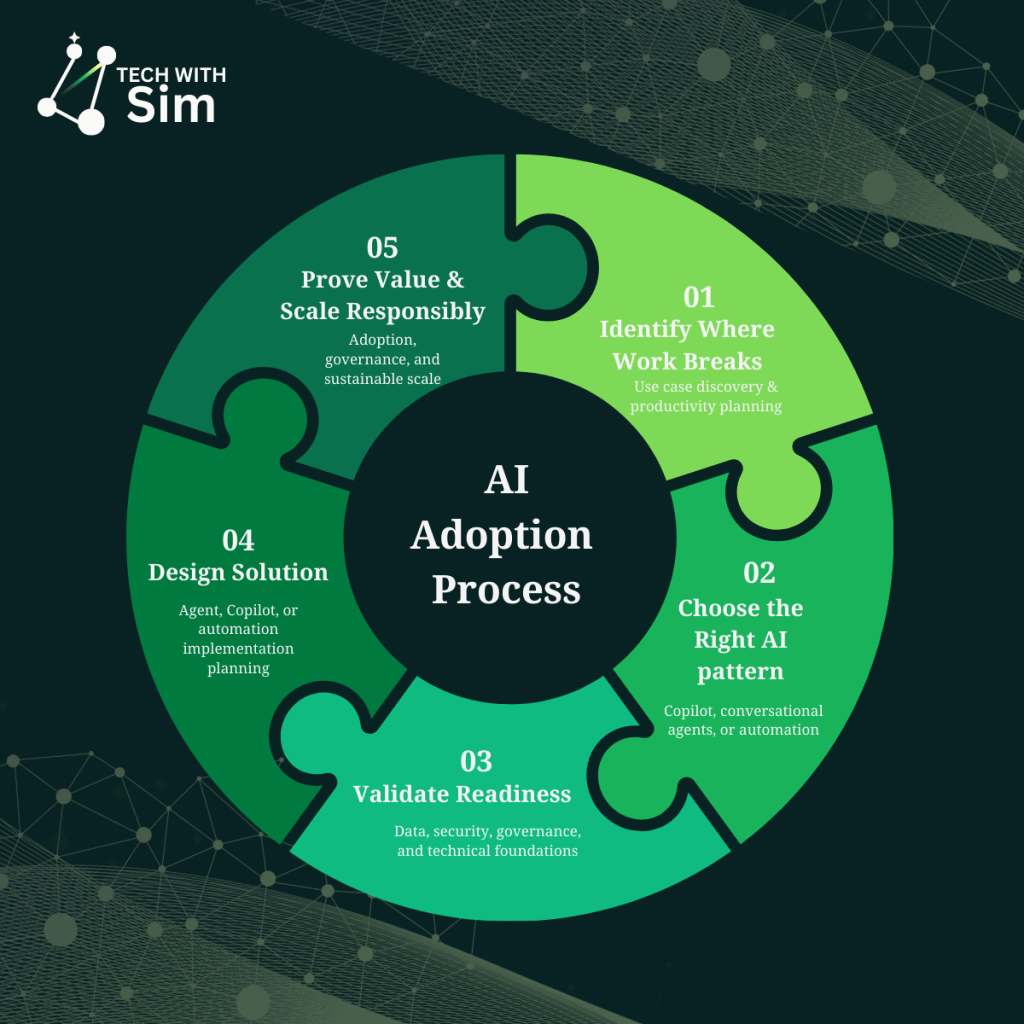
This article focuses on Step 2 in the AI adoption process:
matching the right problems to the right AI capability.
A quick reset: not all AI tools do same job
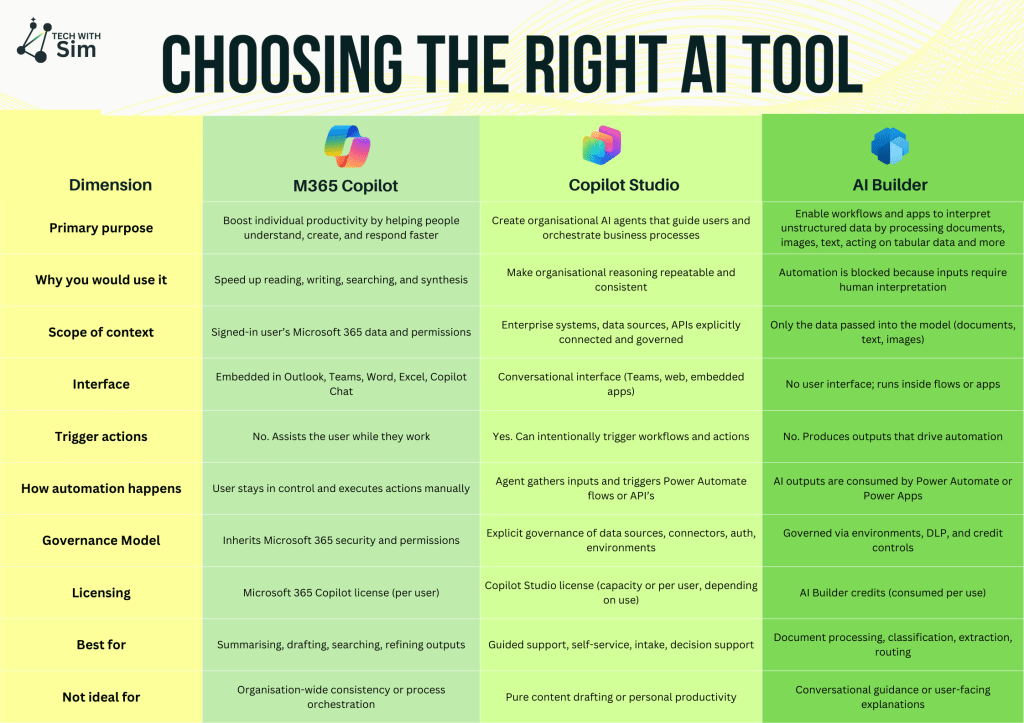
In Microsoft environments, AI generally shows up in three distinct ways:
Microsoft 365 Copilot
Microsoft 365 Copilot is a personal productivity assistant. It helps individuals process large volumes of information and turn that into something usable faster.
It does not redesign processes or coordinate work across teams. It simply helps people think, write, and prepare more efficiently inside the tools they already use.
You will usually feel the pain it solves when inboxes are overwhelming, meetings generate more notes than outcomes, people spend time rewriting or reformatting content, or finding the right information takes longer than acting on it.
Common real world scenarios include summarising long email threads before replying, turning meeting transcripts into action items, pulling together context across chats, files, and documents, drafting first versions of emails, reports, or presentations, and refining tone or structure of existing content.
It works well when the work stays with one person, judgment still matters, and speed and clarity are the main goals.
It is not the right fit when answers need to be consistent across teams, guidance needs to be centrally managed, or work should progress without someone prompting it. At that point, the problem is no longer personal productivity
Copilot Studio
Copilot Studio is a platform for building organisational AI agents.
Conversation is often how people experience it, but the real value is that these agents can guide, reason, and coordinate work within clearly defined boundaries. This is where AI starts supporting how work flows, not just how individuals work.
You will usually see a need for Copilot Studio when people keep asking the same questions, policies or processes exist but are hard to apply in real situations, progress slows down at handovers, or work depends on knowing who to ask or what applies.
Common real world scenarios include internal self service support for common questions, helping people navigate processes or policies, guided intake or triage, onboarding and role based support, and triggering requests, updates, or approvals through conversation.
These agents do not act on their own. They act intentionally, with guardrails, governance, and clear scope.
Copilot Studio works best when guidance needs to be consistent, decisions follow patterns but still require context, and actions can be configured to supplement business process.
AI Builder
AI Builder is not user facing and it is not an agent.
It provides AI capabilities that allow workflows and applications to understand information that would otherwise need a human to interpret. It is what makes automation possible when inputs do not arrive neatly structured.
You will usually feel this pain when requests arrive as emails, documents, or free text, someone manually reads and extracts information, automation exists but still relies on human interpretation, or the same data is re entered in multiple places.
Common real world scenarios include extracting fields from invoices, forms, or PDFs, classifying incoming emails or requests, routing work based on content rather than form inputs, and feeding structured data into workflows or apps.
On its own, AI Builder is mostly invisible. Paired with Power Automate or Copilot Studio, it is often what removes the last manual step.
A quick note on Microsoft Foundry
Foundry sits at a different layer to everything discussed here. While M365 Copilot, Copilot Studio, and AI Builder focus on applying AI within everyday work, Foundry is about building and governing AI models themselves.
That usually becomes relevant later – once AI moves from experimentation into a core platform capability.
What comes next
This article covered Step 2: choosing the right AI capability.
The next step is making sure the organisation is actually ready to support it.
In the next post, I’ll move into Step 3: readiness – including data, security, access, and governance so the solutions you build don’t just work in theory, but hold up in practice.
A good question to leave with:
Which capability are you leaning toward and what problem is really driving that choice?

 Tech with Simran
Leave a comment